Install and configure AIDE
Install and configure Host Based IDS (Intrusion Detection System) "AIDE"
- Install AIDE
yum -y install aide
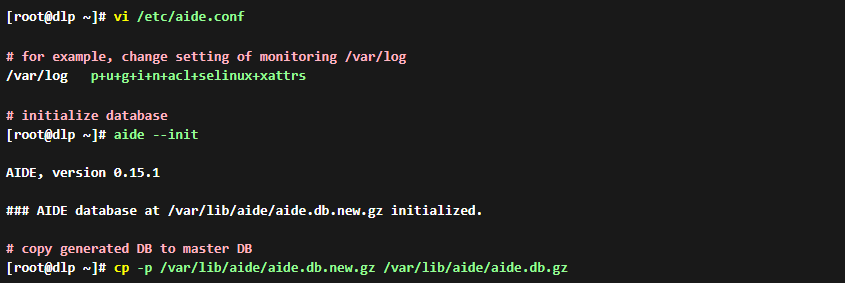
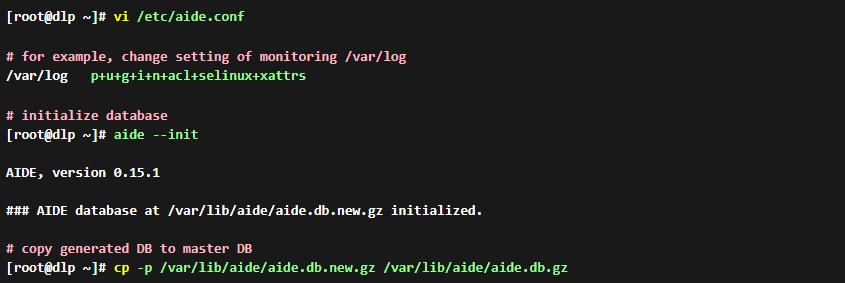
- Configure AIDE and initialize database. It's possible to use AIDE with default config but if you'd like to customize settings, change configuration file like follows. Setting rules are written near 26-84 lines, refer to them.
- Execute checking
[root@dlp ~]# aide --check
# if thete is no unmatch, it displayed "Okay"

AIDE, version 0.15.1

### All files match AIDE database. Looks okay!

# try to change a file and check again
[root@dlp ~]# chmod 640 /root/anaconda-ks.cfg
[root@dlp ~]# aide --check
# detected differences like follows
AIDE 0.15.1 found differences between database and filesystem!!
Start timestamp: 2015-06-17 19:55:20

Summary:
  Total number of files:        39039
  Added files:                  0
  Removed files:                0
  Changed files:                1


---------------------------------------------------
Changed files:
---------------------------------------------------

changed: /root/anaconda-ks.cfg

---------------------------------------------------
Detailed information about changes:
---------------------------------------------------


File: /root/anaconda-ks.cfg
 Perm     : -rw-------                       , -rw-r-----
 Ctime    : 2015-05-24 02:22:04              , 2015-06-19 11:55:15
 ACL      : old = A:
----
user::rw-
group::---
other::---
----
                  D: <NONE>
            new = A:
----
user::rw-
group::r--
other::---
----
                  D: <NONE>
Update AIDE database
- If there is no ploblem even if some differences are detected, then update database like follows
[root@dlp ~]# aide --update
AIDE 0.15.1 found differences between database and filesystem!!
Start timestamp: 2015-06-17 19:56:31

Summary:
  Total number of files:        39039
  Added files:                  0
  Removed files:                0
  Changed files:                1


---------------------------------------------------
Changed files:
---------------------------------------------------

changed: /root/anaconda-ks.cfg
.....
.....

# update database
[root@dlp ~]# cp -p /var/lib/aide/aide.db.new.gz /var/lib/aide/aide.db.gz
Add Cron job and email logs
- Add in Cron if check regulary. Log file [/var/log/aide/aide.log] is updated every time and if there is no difference, it is updated with zero byte, so if you's like to save log files, it needs to create a shell script or send results via email or others
# for example, add daily check in Crontab and send results via email

[root@dlp ~]# vi /etc/cron.d/aide
00 01 * * * /usr/sbin/aide --update | mail -s 'Daily Check by AIDE' root