Preparation
Server Image Installation
Server Image Installation
- Browse to konsoleH and log in at Admin level
- Select or search for your Self-Managed server in the Hosting Service tab
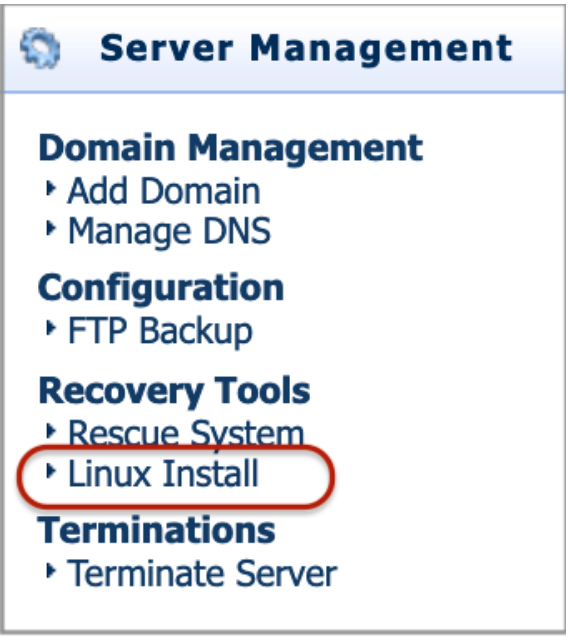
- Select Linux Install under Recovery Tools from the left-hand menu

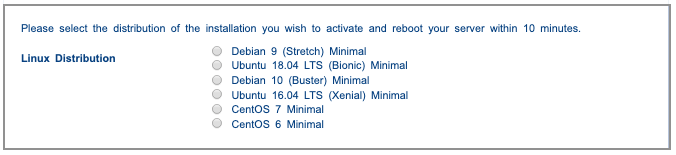
- Select the distribution of the installation that you wish to activate

- Select Activate on the top right-hand side
- Reboot your server within 10 minutes via the RMM / IPMI device
- During the server startup process, you have the option to reconfigure your RAID (TruServ Commerce only) via the RAID controller bios.
- The server will boot into the OS installation environment you selected in step 4
- Follow the onscreen prompts to install your OS and configure your disks and partition layout
- Once the install is complete your server will reboot into your installed OS and will be accessible
- Access your server with the user(s) configured via SSH (some Linux distributions do not allow root logins by default over SSH).
Add Additional Repositories
Install additional repositories
Additional Repositories
- Using the commands below, install the Epel and PHP repositories:
yum install https://dl.fedoraproject.org/pub/epel/epel-release-latest-7.noarch.rpm
yum install http://rpms.remirepo.net/enterprise/remi-release-7.rpm
MySQL Repository
Replace MariaDB with MySQL
yum localinstall 'link address copied from MySQL website'Enable the correct release series
- Manually edit the '/etc/yum.repos.d/mysql-community.repo' file with your favorite text editor.
- Specify enabled=0 to disable a subrepository, or enabled=1 to enable a subrepository, see example below to enable MySQL 5.6 and disable MySQL 5.7 series.
# Enable to use MySQL 5.6 & Disabled MySQL 5.7
[mysql56-community]
name=MySQL 5.6 Community Serverbaseurl=http://repo.mysql.com/yum/mysql-5.6-
community/el/6/$basearch/
enabled=1
gpgcheck=1
gpgkey=file:///etc/pki/rpm-gpg/RPM-GPG-KEY-mysql
[mysql57-community]
name=MySQL 5.7 Community Serverbaseurl=http://repo.mysql.com/yum/mysql-5.7-
community/el/6/$basearch/
enabled=0
gpgcheck=1gpgkey=file:///etc/pki/rpm-gpg/RPM-GPG-KEY-mysql
Note: When sub repositories for more than one release series are enabled, the latest series will be used by Yum.