OS Hardening
Remove Legacy Services
The removal of legacy services
Check for legacy services
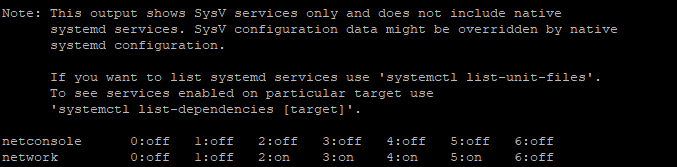
- To check for legacy services, use the command the below
chkconfig --listYou should get an output similar to
Disable legacy services
- Confirm the necessity of the service and disable if not necessary with the below command
chkconfig "service name" off

I.e to disable netconsole
=========================

chkconfig netconsole off
Disable Or Remove Server Services
Disable or remove server services that are not going to be utilized (e.g. FTP, DNS, LDAP, SMB, DHCP, NFS, SNMP, etc.)
Display a list of services available
- To display a list of services available use the command the below
systemctl -t serviceThis will display something similar to

Disable unnecessary services
- Stop and turn OFF auto-start services not needed
systemctl stop "service name"
systemctl disable "service name"

I.e. to stop and disable the Postfix service
============================================

systemctl stop postfix
systemctl disable postfix