Firewall Configuration
Firewall Configuration
Configuring The Firewall
Start and enable the firewall
- To start and enable the firewall use the commands below
systemctl start firewalld
systemctl enable firewalld
Get an overview
Default Zone
- Find the default zone. The default zone is usually public
firewall-cmd --get-default-zone
Display Allowed Services
- Display the allowed services of the zone
firewall-cmd --list-service --zone=externalBy default, "public" zone is applied with a NIC and dhcpv6-client and ssh are allowed.

Display Services Defined By Default
- To list all service defined by default use the command below
firewall-cmd --get-servicesIt should give you an output similar to

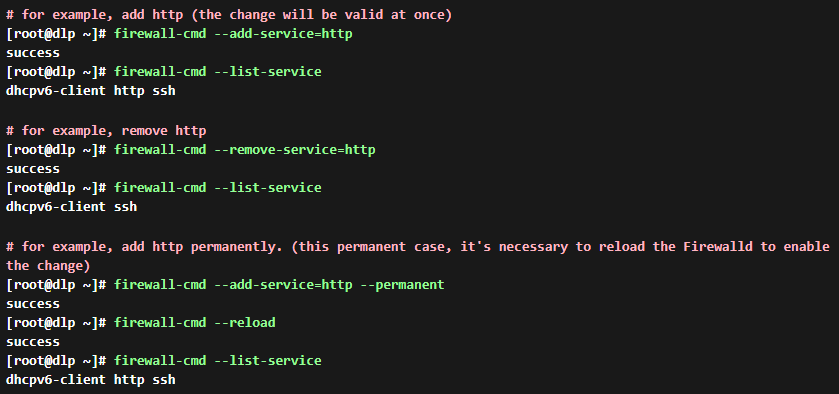
Add/Remove services
- Add or Remove allowed services. The change will be back after rebooting the system. If you change settings permanently, add the "--permanent" option.
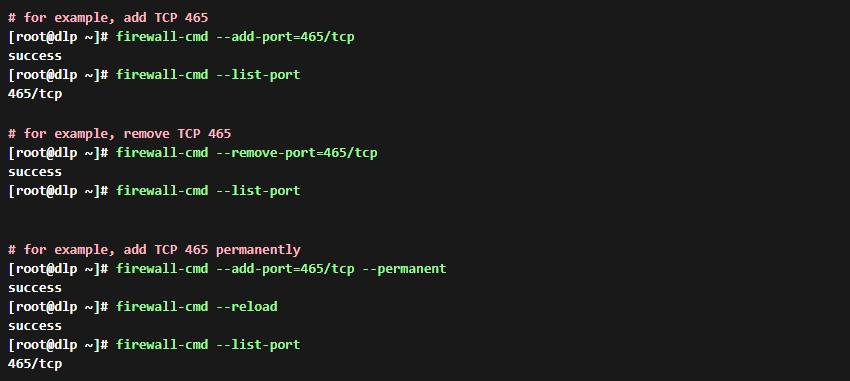
Add/Remove Ports
- Add or remove allowed ports
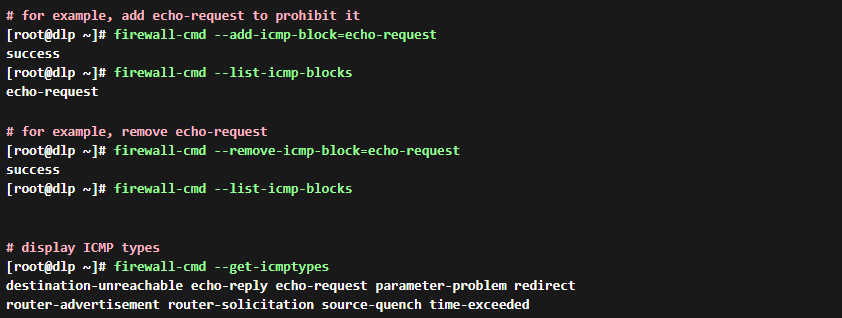
Add/Remove Prohibited ICMP Types
- Add or remove prohibited ICMP types